Why "Just Proxy /blog" Fails Across Cloudflare Pages and Vercel (and What Works Instead)
Subpath proxying a blog across two origins breaks CSS, spawns ghost redirects, and loses to Cloudflare Pages routing priority. Why each failure is structural — and the architectures that actually work.
More in Build Notes
- Why Real-Time Meeting Q&A Isn't Shippable Yet (and the Human-in-the-Loop System That Is)
- Mobile-First Playground: Making an Astrology Grid Actually Work on a Phone (And Go Viral While Doing It)
- How I Fixed AI Over-correction
- The i18n + SEO Cleanup Chronicles: Canonical Chaos, hreflang Therapy, and Other Adventures
- How We Made VORA Bilingual Without a Heavy Localization Stack
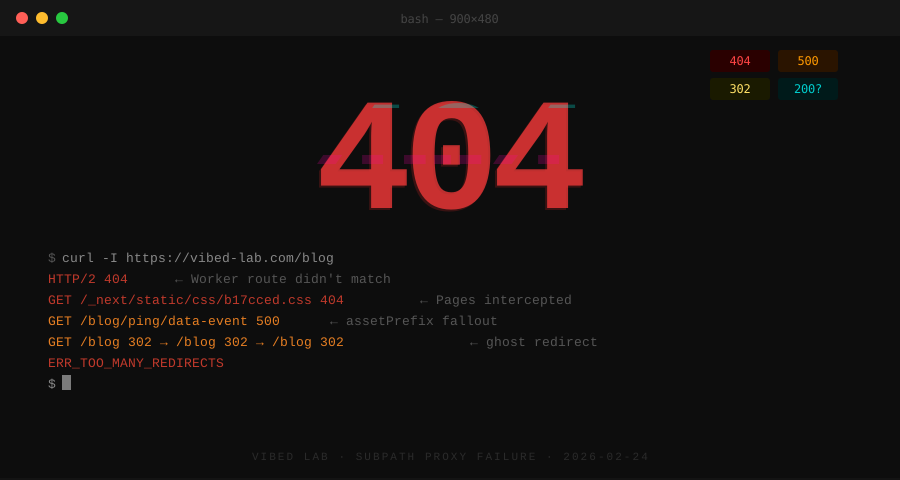
You want your blog served at yourdomain.com/blog — main domain, URL intact. Clean. Professional. AdSense-friendly. The blog lives on one hosting platform, the main site on another, and every Stack Overflow answer swears a reverse proxy will glue them together.
Then the CSS starts 404ing, a redirect loop appears that exists in no config you can find, and _redirects turns out not to proxy external domains at all. This post walks through the full failure chain — Worker routes, assetPrefix, _redirects, and one ghost DNS record — of subpath proxying between Cloudflare Pages and Vercel, why each failure is structural rather than bad luck, and the architectures that actually work.
Real example: everything below comes from trying to serve a Hashnode headless blog (deployed on Vercel) at
vibed-lab.com/blog, with the main site on Cloudflare Pages. Three hours, Cloudflare Workers, DNS records, Vercel config, redirect rules,_redirectsfiles,next.config.js, and my own sanity later: none of it worked. The reasons why are the useful part.
The Target Setup (It Seems So Simple)
The setup: Hashnode headless blog deployed on Vercel at vibed-lab-portal.vercel.app. Main site at vibed-lab.com on Cloudflare Pages. The goal was to proxy /blog requests from the main domain to the Vercel app — URL stays the same, content comes from Vercel.
This is a completely normal thing to want. People do this all the time. There are Stack Overflow answers about it. There are blog posts about it.
Reader, those blog posts lied to me.
Attempt 1: The Cloudflare Worker (Works! Kind Of.)
First attempt: a Cloudflare Worker to intercept /blog requests and fetch from Vercel.
export default {
  async fetch(request) {
    const url = new URL(request.url);
    if (url.pathname.startsWith('/blog')) {
      const targetUrl = 'https://vibed-lab-portal.vercel.app' + url.pathname + url.search;
      return fetch(targetUrl, request);
    }
    return fetch(request);
  }
}
The blog loaded. Sort of. The layout was completely broken — like a webpage from 2003 but worse, because at least 2003 websites were trying to look bad.
Attempt 2: CSS Is Apparently Optional Now
Dev tools revealed the problem: vibed-lab.com/_next/static/css/b17cced2663f0266.css was returning 404. The Worker Route only covered /blog*, so /_next requests were going straight to the main Cloudflare Pages app, which had no idea what to do with them.
Okay, add more routes:
vibed-lab.com/_next*vibed-lab.com/static*
Still broken. Turns out Cloudflare Pages has higher priority than Workers for static asset paths. The Pages app was intercepting /_next before the Worker even had a chance.
This is the part where a reasonable person would stop and reconsider the architecture. I am not always a reasonable person.
Attempt 3: assetPrefix to the Rescue (Not Really)
Next move: tell the Vercel blog to load its CSS/JS directly from vibed-lab-portal.vercel.app instead of the current domain.
const nextConfig = {
  assetPrefix: 'https://vibed-lab-portal.vercel.app',
}
Deployed. Refreshed. CSS loaded! Progress!
But now most of the page content was gone. Network tab showed /blog/ping/data-event returning 500. Hashnode's internal analytics endpoint was firing at a path that didn't exist on Vercel. Cool. Great. Love that for me.
Attempt 4: The Redirect That Wouldn't Die
At some point I noticed blog.vibed-lab.com was redirecting to vibed-lab.com/blog. Fine, that makes sense — except it was creating a loop. So I deleted the redirect rule from Cloudflare.
It kept redirecting.
Checked Page Rules. Nothing. Checked the Worker code. Nothing. Had Claude Code audit the entire project. Nothing. The redirect was a ghost. It existed nowhere and yet it persisted, like a passive-aggressive coworker who won't stop forwarding emails even after you ask them to stop.
Eventually found it: the blog.vibed-lab.com CNAME was pointing to vercel-dns.com. Vercel didn't recognize the domain, so it was silently redirecting everything on its own. Deleted the DNS record. Redirect stopped.
This is why we check DNS records.
Attempt 5: The _redirects File (Narrator: It Did Not Work)
By this point I had abandoned the Worker approach entirely and pivoted to Cloudflare Pages native _redirects:
/blog/* https://vibed-lab-portal.vercel.app/:splat 200
/blog   https://vibed-lab-portal.vercel.app 200
Status code 200 means proxy — URL stays the same, content comes from the target. Deployed. Opened vibed-lab.com/blog.
"This site can't be reached."
Turns out Cloudflare Pages _redirects with status 200 does not support external domains. This is technically documented somewhere. I did not read that part of the documentation. Switched to 302.
Now the root domain (vibed-lab.com) was serving the blog. Because the Worker Route vibed-lab.com/* was still catching everything. Of course it was.
Why This Architecture Is Structurally Hard
Looking back, the failures weren't bad luck — they were predictable consequences of the architecture I tried to force. Three reasons subpath proxying between separate origins (Cloudflare Pages + Vercel) doesn't work cleanly:
1. Same-origin policy bites at every layer. Cookies, localStorage, service workers, postMessage — all of them care about the origin, not the path. When vibed-lab.com/blog/* is served from a different origin than vibed-lab.com/*, you fight CORS, cookie scoping, and CSP at every step. The fixes work in isolation but accumulate friction.
2. Cloudflare Pages routing prefers static assets first. Cloudflare Pages resolves a request by checking the deployed static asset tree before applying redirects or workers. If your blog's HTML/JS happens to share a path prefix with anything in the static tree, Pages serves the wrong file silently. Debugging means understanding the resolution order, which isn't well documented.
3. assetPrefix and basePath solve different problems. Next.js basePath rewrites internal links and routes, but doesn't change where the build is served from. assetPrefix only applies to static asset URLs. Neither helps when a CDN intercepts before your app even sees the request. The two configs look related but compose poorly.
The takeaway isn't "subpath proxying is impossible" — it's that subpath proxying between two origins on a single domain requires you to own the routing layer. Either both apps live on the same Pages project (single origin), or you put both behind a Worker that routes deliberately. Mixing two managed platforms with overlapping path responsibilities is an architecture that has no clean exit.
If you find yourself reaching for this pattern, the cheaper alternative is almost always subdomain split (blog.example.com and app.example.com) with shared auth via cookies on the parent domain. You give up the URL aesthetic but keep the architecture sane.
The Fix Nobody Wants to Hear
There is no config tweak that rescues a two-origin subpath proxy. The clean exits are a single origin or one Worker that owns all the routing — everything else just accumulates friction.
Real example: after three hours of Workers, DNS records, Vercel config, redirect rules,
_redirects, andassetPrefix, the fix here was to scrap Hashnode entirely and build a real Next.js blog inside the main project./blogis just a route now. No proxies. No Workers. No_redirects. No external domains. No ghosts.
If you're staring at the same architecture, three takeaways:
- Every asset and API call becomes your problem. Every CSS file, every JS bundle, every analytics ping, every internal API call from the external app needs to either be rewritten or proxied separately. It's fighting against how the web works, and the web usually wins.
- Own the routing layer or don't proxy. Either both apps live on a single origin, or both sit behind a Worker that routes deliberately. Mixing two managed platforms with overlapping path responsibilities is an architecture with no clean exit.
- The subdomain split is almost always cheaper.
blog.example.comwith shared auth via cookies on the parent domain — you give up the URL aesthetic but keep the architecture sane.
If you end up on Cloudflare Pages for the single-origin route, How to Deploy a Static Site to Cloudflare Pages Without the Gotchas covers the day-one config that bites later.
Turns out "just proxy it" is the "just add a login page" of infrastructure advice.
2026.02.24
Written by
Jay Lee
Korea-Licensed Pharmacist (#68652) · Senior Researcher
Korea University, College of Pharmacy (B.S. + M.S., drug delivery systems & industrial pharmacy). Building production-grade AI tools across medicine, finance, and productivity — without a CS degree. Domain expertise first, code second.
About the author →Related posts